Leaderboard


Popular Content
Showing content with the highest reputation on 10/23/26 in Posts
-
OPEN THE GATES!!1 point
-
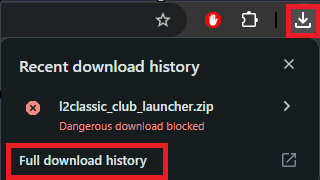
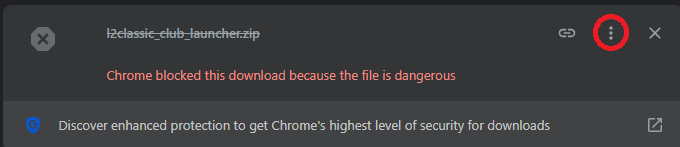
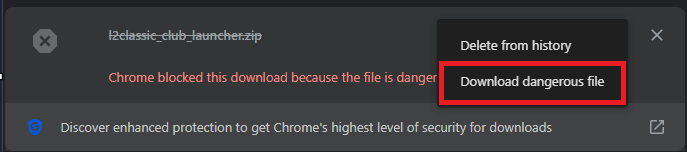
🛑 Browser blocks the launcher/updater. Is it safe? Yes, our file is 100% safe. Google Chrome, Microsoft Edge, Opera, and other browsers may block the download or show warnings. This happens solely due to automated security filters, not because of an actual threat. Why does this happen? * No commercial signature: Our auto-updater is an independent software development. To prevent operating systems and browsers from flagging it, the program requires an expensive digital signature (Code Signing Certificate). For independent gaming projects, purchasing these certificates is not practically feasible. * Uncommon download: Security algorithms (such as Google Safe Browsing or Windows SmartScreen) treat any .exe file as suspicious if it is downloaded by a dedicated gaming community rather than millions of people worldwide. Without a built-in global reputation, the file is flagged automatically. * How the updater works: The program is designed to download patches and game assets directly into your game folder. From a browser's perspective, downloading and modifying files looks like "suspicious activity" typical of malware, even though the launcher is just updating the game. How to download the file? 1. Open your browser's download history by pressing Ctrl + J (or through the browser menu). 2. Find the blocked launcher archive. 3. Click the three dots icon (or "More actions" / "Details") next to the file. 4. Choose "Keep dangerous file" (Download dangerous file) or "Keep anyway" and confirm the action. You can always check our file yourself on the independent website VirusTotal, which scans data using over 70+ different antivirus engines simultaneously and confirms the code is clean.
 1 point
